Showing posts with label review. Show all posts

multimedia course on blogging

I don't know whether it works or not and, may be whether I need it in the very first place. Still I see no harm in trying & evaluating it. It is from a site called simlpe.ology... They have put precondition to publish this piece of code in one’s blog to grab a copy of Blogging Guide! Does one really need a blog guide? A blog is a blog is a blog – isn’t it? Anyway, here is the code for that codeware (as freeware...)

I'm evaluating a multi-media course on blogging from the folks at Simpleology.  For a while, they're letting you snag it for free if you post about it on your blog.

It covers:

  • The best blogging techniques.
  • How to get traffic to your blog.
  • How to turn your blog into money.

I'll let you know what I think once I've had a chance to check it out. Meanwhile, go grab yours while it's still free.

Yet another [FAILED] online Auto-translation service : Babylon

Though Google is expanding its online translation business at a never ending pace, some other players like Babylon and Bab.la were also testing waters.

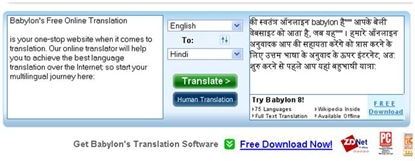
Let us try to translate Babylon’s own English string (copied from their site) in to Hindi through Babylon’s Online Machine translation service:

ORIGINAL :

Babylon's Free Online Translation

is your one-stop website when it comes to translation. Our online translator will help you to achieve the best language translation over the Internet; so start your multilingual journey here:

TRANSLATED :

की स्वतंत्र ऑनलाइन babylon है'''''' आपके बेली वेबसाइट को आता है, जब यह'''''' । हमारे ऑनलाइन अनुवादक आप की सहायता करेंगे को प्राप्त करने के लिए उत्तम भाषा के अनुवाद के ऊपर इंटरनेट; अत: शुरु करने से पहले आप यहां बहुभाषी यात्रा:

Here is the screen shot if you don’t believe it:

clip_image002

Any one with little knowledge of Hindi will outright reject this ridiculous machine translation. For languages like Hindi, where everything – that includes ‘form’ and ‘syntax’ – changes, no machine can ever translate as accurate as Human.

Let us try free Online Dictionary service by Babylon. Though I could not find link to English-Hindi dictionary, I believe Babylon does have it. I tried English-English dictionary for word - ‘Eternal’. The results were quite impressive. I got multiple results and references from Webster's Revised Unabridged Dictionary (1913), Wordnet, Wikipedia etc.

clip_image002[5]

Verdict : Online translation fails, Online Dictionary works, but needs more language options.

Windows Vista Resource Kit : A valuable reference book for all

windows vista resource kit review

Windows Vista Resource Kit (Updated for Service pack 1) is jointly authored by Mitch Tulloch, Tony Northrup, Jerry Honeycutt with Microsoft Windows Vista team and Published by Microsoft Press. It may be considered as valuable, complete reference book for Windows Vista. A must for Windows Vista System administrator, since book had not only covered all new features of Windows Vista, but had few dedicated chapters on Windows Vista Troubleshooting.

The book’s content is divided in 6 parts namely,

  1. Overview : What’s New, Improvement, security enhancement etc.
  2. Deployment : Setup and installation issues, testing application compatibility, configuring Windows etc.
  3. Desktop Management : Managing group policies, managing user disk & file system, bitlocker drive encryption in detail, managing printing, search, Internet Explorer etc.
  4. Desktop Maintenance : Desktop Health, software update etc.
  5. Networking : Configuring Firewall, remote users etc.
  6. Troubleshooting : Issues related to Setup, Startup, Hardware, Driver, Disk Issues etc.

Further, the book contains valuable, easy How to guide for practically every tough task. For example, here is a few list that is self explanatory :

  1. How to use startup and recovery dialogue box
  2. How to use system configuration tool
  3. How to use BCDEdit…

And so on…

The book is voluminous one and above stated 6 parts of the book had been further divided in to 32 detailed well crafted chapters. The book is full of illustrations and minutest of Vista’s aspect such as “how to use on-screen keyboard” had been illustrated. The book’s language is simple, the format is well designed for easy navigation and at the end, you can find glossary where you can search for the topics with the given keyword.

So, if you are going to work on Vista for quite some time, then go no further. Consider owning this book and you will never regret for your decision.

---

Windows Vista Resource Kit (Second Edition)

Authors : Mitch Tulloch, Tony Northrup, Jerry Honeycutt with Microsoft Windows Vista team.

Publisher : Microsoft Press

ISBN No. 9780735625969

Pages : 1969, with a companion CD

Price : $69.99 Discounted price &44.09 at Amazon.com

Yet another English to Hindi Machine translation system : Matra 2

There was this Mantra - the English to Hindi Machine translation system, then comes Google English to Hindi (and vice versa) online machine translation system.

Finally, here comes yet another English to Hindi Machine translation system called Matra2 from CDAC.

Naveen Kumar of CDAC tested Matra2 against that of Google Translate and here comes an interesting comparison:


Here are some of the sentences that Naveen Kumar had tested randomly. (M) stands for Matra translations and (G) stands for Google translations

AIDS is a disease
ए.आइ.डी.एस एक बीमारी है। (M)
एड्स की बीमारी है (G)

Rama ruled Ayodhya for many years
राम ने बहुत साल के लिये अयोध्या रल किया। (M)
राम अयोध्या के लिए कई वर्षों तक शासन किया (G)

Rama killed Ravana
राम ने रावण को मारा। (M)
राम रावण मारे गए (G)

This is a dead language
यह एक मृत भाषा है। (M)
यह एक मृत भाषा (G)

English is national language of England
अंग्रेजी एन्ग्लन्ड काई राष्ट्रीय भाषा है। (M)
राष्ट्रीय भाषा अंग्रेजी है इंग्लैंड (G)

President bush is dumb
राष्ट्रपती झाड़ी गूज़्गा है। (M)
राष्ट्रपति बुश है मूक (G)

I like translating documents
मैं दस्तावेज़ों का अनुवाद करती हैं। (M)
मैं जैसे दस्तावेज़ों का अनुवाद (G)

I like document translation
मैं दस्तावेज़ अनुवाद पसन्द करती हूँ। (M)
मैं जैसे दस्तावेज़ अनुवाद (G)

India is a country of thinkers
भारत चिन्तक का एक देश हैं। (M)
भारत एक देश के विचारक (G)

This course provides you a comprehensive overview of what is open source, how to start using it, how to be part of the open source community and how to contribute to the community. At the end it introduces you various bussiness models and licences that exist today in the open source world.

यह पाठ्यक्रम प्रदान कर आप एक विस्तृत सिंहावलोकन का वट हो खोल स्रोत , कैसा शुरू हो जा इस्तेमाल कर वह , कैसा हो भाग का खोल स्रोत समाज और कैसा सहयोग दे समाज एन्ड पर, वह आप भिन्न कामकाज नमूने और लिसेन्सिज़ वह खुला स्रोत विश्व में आज मौजूद हैं पेश करते हैं। (M)

यह पाठ्यक्रम प्रदान करता है आप एक व्यापक परिदृश्य का खुला स्रोत क्या है , कि किस प्रकार इसका प्रयोग शुरू करने के लिए , कैसे हो समुदाय का हिस्सा खुला स्रोत और कैसे योगदान करने के लिए समुदाय के हैं . अंत में यह परिचय आप व्यापार के विभिन्न मॉडल और लाइसेंस मौजूद है कि आज दुनिया में खुला स्रोत है . (G)

Malaria killed most people in Africa
मैलारीअ ने अफ्रिक में मोस्ट लोगों को मारा। (M)
मलेरिया अफ्रीका में अधिकांश लोग मारे गए (G)

Insects are most dangerous animals on this planet
कीड़े यह प्लैनिट पर मोस्ट खतरनाक पशु हैं। (M)
सबसे खतरनाक जानवर हैं कीड़ों पर इस ग्रह (G)


Interesting? perhaps. All said, as database increases, translation quality is bound to refine. And in near future, Machine translation will be near perfect.

By Goosh ! it is equally great for localized search too!

Everybody is excited about new, browser based, command line search tool Goosh. The very concept and easy of web app had steal the hearts of one and sundry.

Another best part of the Goosh is – it is equally compatible and efficient while searching in Localized languages. It means, Goosh is fully Unicode enabled.

Here is my take on Goosh with Hindi language:

I gave the command –

guest@goosh.org:/web> blogs मुंहफट

And the result is :

goosh blog search

Pretty good and admirable, neat and clean and well, EXACT – what I had wanted in first place.

Then I tried to Translate I Love You in Hindi. For this, I gave following command in Goosh:

guest@goosh.org:/web> translate en hi I love you

And the result is –

goosh english- hindi translation

Again, perfect. Though the translations of long sentences got meaningless - but then it is no fault of Goosh but that is of Google translator tool itself.

Long live Goosh. I want many more command to be included it it soon. For example – this one:

>email a@a.com Hello how are you

Will send my message Hello how are you to a@a.com. And what about this –

>twitter a.twitter.com ***** Right now I am writing a review on Goosh

Will publish Twitter post Right now I am writing a review on Goosh to my twitter account.

Well, the options and wish list are endless….

Acrobat.com : Decorated sans Unicode support

adobe buzzword unicode not supported

The all new online office suit - Acrobat.com is all set to alter user experience of any given web application. This online office suit has most beautifully decorated web interface, its Flash based design is real fast and cool animated menus were cool to your eyes too. You can export, import and share your document as any other web office application.

But it has many glitches too. For example, it has Flash based login form instead of plain HTML that may hinder simple copy paste login.

The biggest letdown factor is lack of Unicode support. When you try to enter Unicode character in Buzzword documents, all you will see were dots. However, while copy pasting the same to local notepad, Unicode characters magically reappears. It indicates that may be there were some problem in displaying and rendering Unicode characters.

Still, Acrobat.com offers many new, funky features that users will love and adore.

Hindi Spell Checker Plugin for Firefox

Here is the first ever release of Hindi Spell checker plugin / addon for Firefox. It works well in FF version through 1.5 to 3.x.

Download and install Hindi Spell checker Addon for firefox from here.


To use, type in Hindi in any input box within Firefox and right click anywhere in Input box and then select Hindi Spell Check. Misspelled words will be underlined with red marks. Right click on them and select the suggested, appropriate word. You can add new Hindi word by selecting Add this Word.

Here is some example -


Check spelling on Google Indic Transliteration :

firefox spell check add on v3


Check spelling in Blogger post editor :

 firefox spell check add on v3 a

Misspelled Word suggestion:

firefox spell check add on v3 b

For detailed instructions to how to use Hindi Spell Checker Firefox plugin, pl see this page (Hindi)

Thanks to G. Karunakar for providing Hindi-Words (Approx. 1 Lakh, some needs proof-reading though.)

Why not to purchase Compaq Pressario Notebook V3225AU!

I had blogged about certain issues that I had faced with this particular unit in my previous post. The main reasons were - Its 64 bit Hardware was bundled with 32 bit operating system, and it is getting too hot to handle at its bottom!

After a few months of use, its optical drive starts giving trouble. To get it repaird, I had to submit it at Indore - that is 130 KM away from my location!

Anyway, I finally submitted the said unit to My local Vendor Satyam Computers Ratlam on 29th November 2007. It was delivered to Redington Indore on Dated 1-12-2007. But was refused since they do not accept on Saturdays and Sundays. Finally, it was delivered on 3-12-2007 for repair! (And, you talk about 24x7 service man!)

After 10 days, I got my repaired Laptop on dated 10-12-07. And, shockingly I found that the DVD drive is not reading any CD/DVD. After repair, the laptop was received in worst condition. I resubmitted the said unit for repair again, and am keeping my fingers crossed - when will I get my laptop back, and in good condition? Meanwhile, people at Redington Indore don't talk nice. I had registered a complain to HP-COMPAQ. Let us see what happened.

Meanwhile, I advise my readers to stay away from purchasing such type of faulty pieces. Further, always purchase Laptop/Notebook of brands that give you ON-SITE warranty or at least their service centers were located nearby you. I had burned my fingers, and I will not let this to my readers.

Following is the TEXT of complaint I had lodged at HP-Compaq site:
-----------

My Compaq Pressario Notebook V3225AU - Sl. No. (S)2CE7214Q0X, Product No. (1P)RY301PA#ACJ had giving me error in reading DVD/CD Rom drive. The said unit was deposited to HP service center REDINGTON INDORE for repair. The said unit was deposited on dated 3-12- 2007 to rectify the problem in reading CD/DVD ROM drive.

The unit was only repaired and delivered on dated 8-12- 2007 - i.e. after 6 days. With utter dismay, It was found that the unit was not reading any CD/DVD media - while earlier it was reading some. The repaired unit was received in worst condition.

The said unit is again submitted today to Redington Indore, India for repair.

The technician at Redington Indore called me for administrative password of my Laptop. Which, in my opinion, was completely unnecessary, and I refused for that. Another person misbehaved and blamed me that I had installed 3 Pirated Operating System, and that could be the reason behind not running CD / DVD. But the said laptop was not BOOTING with live bootable CD / DVDs. Neither it is reading and writing any CD/DVDs

I am very much disappointed with this Compaq Laptop, its AFTER SELLS SERVICES particularly of Redington Indore and all that. I am going to advise my friends and my blog readers to stay away from buying such product.

Please look in to the matter and solve my problem at the earliest.

PS- I am using computers since last 20 years or so. I am a proud owner of COMPAQ PRESSARIO Notebook that had come with 8 MB RAM and 250 MB HDD (a premium hardware combination then). And, this ancient piece is still working (Win95) perfectly!

--------

Buzzworld: Not the Real Web-Based Word Processor...

Buzzworld:

The First Real Web-Based Word Processor

buzzword

Adobe's flash based online word processor - Buzzworld claims to be The First Real Web-Based Word Processor, but it failed in many count. Firstly, it is not UNICODE compliant. At least, it had not displayed Unicode Hindi content, and you cannot input Hindi Unicode matter in to it. Any Real Web app must be Unicode compliant these days.


Further, it is very slow in loading and response - even with my broadband connection. Other Online wordprocessor, once loaded work well unless they are downloading/uploading something.


IMHO, Buzzworld is not the Real, let alone the First!

HP’s technical incompetence


In their posts, Amit, followed by Alok reenergized my recent wound. Actually, they have talked about HP’s technical competence – how HP had blown down its own, running data center just to show that their mission critical applications did not affected a bit. But this news made me sick. Real sick because HP had shown total technical Incompetence on me.

OK, let me tell you in detail.

I had needed a Laptop once again (My old Compaq 33 Mhz, Pentium 386, 250 MB HDD, 8 MB RAM, Win95 had died two years ago giving uninterrupted, faithful service to about eight years) so I collected information, specifications, referred laptop shoot outs, starred endlessly at comparison charts, build my own laptop about a dozen times at Dell’s site and then finally settled for Compaq Presario V3225AU. This machine looks advanced enough and less taxing to my pocket. Digit – July07 had already declared this machine as best buy in its category.

Let us see some of the main specifications of Compaq Presario V3225AU: –

Processor – AMD Turion64 MK-36 2.0Ghz

OS – Windows Vista Home Basic

Chipset, Memory --- Blah blah…., but they were the best in their category.

Telling you only two main specification has a reason – I just want to tell you where HP wounded me and had shown me its utter technical incompetence.

As you had seen above, this laptop contains an advanced 64 bit AMD Turion mobile processor. To get most out of it, you MUST install 64 bit OS and applications on this laptop. But I got first jolt after purchasing it – it was supplied with 32 bit Windows Vista Home Basic! I had never imagined this kind of technical backwardness from HP!

The outer cover shows you the picture of a castle, but inside it is only hut!

I got more jolts later. The laptop contains no genuine installation media – instead, instruction manual told me that user must first create his own backup of installation and OS through Recovery Manager Program. I tried thrice but failed.

Further, my life goes all hell again – Compaq online registration dialogue box comes pop out every ten minute or so even after registering successfully at least five times. I finally got rid it by deleting its executable file that needs your time and patient to hunt down it.

So, don’t you think - HP had blown me off to show its Technical Incompetence? I am feeling cheated. Really cheated. What do you say?

First look at Windows Vista Hindi


Recently, Microsoft had released Windows Vista Language Installer Pack (lip) for Hindi language. It is a sleek 2.6 MB file that you can download from here and install in your Vista machine.

I tried to give a quick look on Windows Vista Hindi.

It is far better than its predecessor – Windows XP Hindi. When you install Language pack in Windows XP, it was nearly an irreversible process and you will find difficulty in bringing back your default interface.

This major annoying problem had been beautifully addressed in Windows Vista language pack. Now you can select language from control panel, and to change your system language, all you need is a reboot. Different users can have different language and you can install as many language pack as you wish. Unlike in Windows XP, in Vista, you can uninstall and disable language packs easily.

Still, Windows Vista is way behind against multilingual capabilities of Linux where you can use multiple language environment simultaneously, and, in background, you can start and login at least six different language desktops simultaneously.

Windows Vista Hindi had many shortcomings that includes –

  • You cannot install Vista Hindi LIP in 64 bit architecture as of now.
  • Vista’s default Hindi font is very small, and hence created visibility problem. You need to increase desktop font size from 8-9 to 10-11 for each and every item which is very cumbersome and annoying. As in Linux, there must be some facility to increase all font size in one go within the same windowing scheme. Hadn’t developers / testers notice this? Or they have different, larger desktops?
  • One can easily guess that quality and quantity of translations were not up to the mark. User interface has been translated most, and the help files had not been translated at all.
  • In most cases, translations appears straight from English to Hindi – word by word. You can find at least a couple of translation error in most pages. Some example –

There is a translation at some place – कार्य पर केंद्रित करने के लिए इसे आसान बनाएँ” what do you understand by this string? I also do not understand what it meant.

At another place it says – इससे सॉर्ट करें. Mr. Translator, had you translated it this way - इस विधि से छांटे then it might have been a bit correct and better.

Similarly, Windows Media Player’s Now Playing becomes अब चला रहा है in Hindi. You will find many strings like ताज़ा आइटम्स as well as व्यक्तिगत बनाऐं.

In a couple of his blog posts, Alok had already thrashed poor quality of Windows XP Hindi.

Verdict : In all, there is a feel and a sense of goodness, a kind of euphoria users feel while using Vista Hindi especially if you are one among Hindi loving people. So what are you waiting for? Download and install Windows Vista Hindi language pack today. And, there is no need to loose heart if you are using old, faithful Windows XP. You can find link to download Windows XP Hindi LIP from the same, above stated location.

***-***

Aol.in ???????


aol.in recently tried to invade Indian Internet user base with a bang. It is trying every idea and pushing every effort to win Indian Internet users.

You can find aol.in advertisement in virtually every media. Indian blogs – where Adsense advertisements were embedded in their blog posts - were bombarded with aol.in advertisement. You can see a performer blowing flames in aol.in advertisement – can it blow out other players – Yahoo or Google? Certainly not. Why? Let us see.

Completely blown out with aol’s flame that I encountered everywhere, finally I opened an email account on aol.in.

Aol.in exactly looks like Yahoo!. Its appearance is exactly Yahoo! look alike and at times you forget that you are not in Yahoo!. Further, there is nothing new in aol.in’s interface and it is crowded with flash based advertisement. The interface takes time to load completely. Though for slower connection, it has older interface that loads a bit faster but comes with some less functionality. I wanted to test its Unicode Hindi handling capabilities. For this, I send a Hindi mail to this new aol.in account and send another one from this account.

And, predictably, result came out – the same Question marks…??????

Though the Unicode Hindi matter in the body of email remain intact, its From / To and Subject field gets corrupted.

Aol.in is trying to invade Indian internet user base with a new aol.in brand name, but it had miserably failed in addressing Indian Language’s Unicode issue – or it is luring only Indians who are using English?

Will aol.in be able to get the taste of success in India? Only time will tell. Since it is not offering anything new that is to be noticed upon, users may remain shy away from aol.in for quite some time. And, unless there were some compelling reason, no one will switch to aol.in either.

And, yes, one thing you can bank upon - aol.in handles spam perfectly – at least it seems. It puts my own mail in to spam folder that I had send from that alternative mail address which I had used to register to create my new aol.in account!

Verdict: for Hindi Unicode – Gmail and iGoogle are the best, and you don’t need to look beyond that!

del.icio.us Tags: , ,

Technorati Tags: , ,

Why MSN sucks and Google rocks?

Recently, I simply wanted to install latest version of Windows Live writer. Earlier, I had tried it and had dumped it in favor of TinyMCE because Windows Live Writer was producing errors while handling Unicode Hindi Text. Recently, I had read some favorable review from most of the quarters and wanted to give a try.

To get latest version of Windows Live Writer, I simply head to Microsoft’s Download center, and searched for the Key word – “Windows Live Writer”. I had deliberately kept to search in all section checked.

Windows Live writer is from Microsoft stable, and supposed to give you download link for latest version of Windows Live writer.

Instead, it simply gives me error message that it could not find keyword –“Windows Live Writer”. Whereas, Windows Live Writer is gaining ground and today, it is one of the best offline Blog writing tool. I tried MSN search, but I failed again. I tries various locations and search terms, but failed every time.

Finally, I turned to every one's favorite - Google. I used the same keyword –“ Windows Live Writer”, and voila – I got at least 3 working links that points to Windows Live Writer download in first 10 search result.

Way to go MSN. You simply failed to search your own popular content! Very bad. Indeed very bad! Me too, feeling bad about it!

PS – I had since been shifted to Windows Live Writer. It handles Unicode Hindi beautifully and blog publishing through it had become a child’s play. I wish, some day it had built in Hindi Spell check. Then I will completely dump my MS Word in favor of WLW. :)

Joost's greatest joke!

Joost - the new kid on Internet - that is all set to redefine your habbit of viewing telivision had played a game on me.


In fact, it played a joke on me.


Today, when I tried to view some TV through Joost, it asked me to upgrade to a newer version of Joost, which I obediently followed.


After a few screen, what I saw was un-expected. It was a practical joke! You can see it yourself. This is the screenshot of the practical joke Joost played on me!


It says-


We have detected that your PC may not have enough resources to run Joost(tm) correctly.


..........................MINIMUM ..................YOUR PC


CPU.........................500 MHZ ...........................2994 MHZ


RAM........................ 512 MB............................... 1007 MB


VIDEO .....................48 MB ..................................64 MB

MEMORY


WINDOWS .................XP ........................................VISTA

VERSION


DIRECTX ....................9.0C .......................................9.0C
VERSION


Obviously, my PC has MORE resources than Joost had detected, yet it said exactly opposite. Yet, it is another matter that Joost runs flawlessly after ignoring this message. :)

Apple Safari can't display Unicode Hindi font either!


(Above screenshot courtesy - Apple Safari)


The best and fastest Browser till today in the world - Apple's Safari is useless for Unicode Hindi pages like this .

It simply does not display Unicode Hindi font correctly. It simply fail to render Unicode Hindi font properly.

(Above Display : by Safari)


(Above display by Opera)


Come on, Safari, you may be the fastest and the best among browser. But, until you weed out this bug, you will remain useless for us.

Tag ,,,

Welcome to the world of Online Desktop

You install and manage applications in your PC, decorate your desktop with themes and wallpapers. But it remains confined with your PC. Even in case of your Laptop, it remains with your particular Laptop - and you have to carry it everywhere to use it.

Well, there were some online services available now that can provide you Desktop like environment (some call it WebOS) through a web browser - with applications and storage spaces - that you can customize and access anytime from any computer and from any where in the world!

Two such popular online applications - ajaxWindows and Desktoptwo

are review here.

You need to register and create an account for using these services. Registration to both is simple process, but require a valid e-mail ID.

ajaxWindows looks and feels just like your own PC's desktop or mobile PC. It has a start button, a task bar, a desktop, icons, programs, widgets, a control panel and a file browser. The ajaxWindows works within a browser and it looks as your regular PC, but, with one BIG difference - everything is online! And the best part is you can access your ajaxWindows Desktop from anywhere, and from any computer with an Internet connection. ajaxWindows lets you have your files, your bookmarks, your documents and pictures, your music, everything you need to get some work done or have fun on a PC!

ajaxWindows, lets you do these and many more:

  • Run web applications - for example, you can write document, create graphics or make presentation with applications such as ajaxWrite, ajaxSketch and ajaxPresent.
  • Launch widgets
  • Browse to your favorite web sites
  • Listen and organize your own music through mp3 music player
  • Personalize your desktop with your favorite wallpapers, sounds and bookmarks
  • Make free phone calls to your friends or coworkers
  • Create a slide show with your pictures
  • Instant Message
  • You can store your documents, pictures, music and other files (up to 1 Gigabyte) for FREE

In ajaxWindows personalizing your desktop is real easy. ajaxWindows has an easy to use control panel where you can change and configure your wallpaper or themes to your own likings. There were several background images to choose from, or you can add your own. ajaxWindows supports full drag and drop hence you can place your icons where ever you want them, and move widgets and windows to where ever you think they need to be.

You can also add widgets and other web services and applications in ajaxWindows Desktop. For this, either go to [Start] -> Add Widgets or [Start]->Add Programs, or double click on the Add Widgets or Add Program icons on your ajaxWindows desktop.

You can synchronize your document folder from your PC to ajaxWindows Desktop. Upon first login, you will be asked if you want to copy your documents, pictures, music, wallpapers, bookmarks and more from your local PC to be stored in your personal ajaxWindows space. ajaxWindows provide 1GB free storage space. That you can enhance for an annual fee.

In actual usage condition ajaxWindows simply failed to work with Opera browser. Though it worked in Firefox with some hiccups. It worked well in Internet Explorer. However, the online document editor - ajaxWrite was terribly slow and not worth trying. It simply does not worked in either Opera or Firefox.

*********

Desktoptwo is also a free web-based desktop that mimics the look, feel and functionality of a local computer, all contained within one browser window and fully accessible from any Internet-connected device.

Desktoptwo works as your free mobile home on the Internet with all of your personal information, programs and applications in one easy-to-use, feature-rich location and, because all you need is a web browser to access your account, even the simplest web device (whether yours or someone else's such as cyber café's PCs) can become your personal space.

What's more... no local installation of anything is require means that Desktoptwo leaves no trace behind, that is why Desktoptwo says that "wherever you go, whatever you do, you can bring your desktop too."

Desktoptwo also provide you 1 GB free online storage where you can store your files. 3MB MP3 file was uploaded and played it with its built in mp3 player. The experience was marvelous and trouble free.

Desktoptwo provides you OpenOffice 2 as your document creator. Due to this, the online document creation become sluggish. However, OpenOffice 2 is a full fledged Office suite where you can create word/Excel/presentation online.

Similar to ajaxDesktop, Desktoptwo also have many online program built in, and are really useful.

Some day, it appears - we will completely rip off our PC/Laptop with local program and only use Online Application/Desktop.

Tag ,,,

Blogger in Draft - Rain of features in Blogger!


Blogger in Draft - Blogger going feature rich!

We may expect torrential rain of features in Blogger some time soon. Or, at least, it seems. Google Blogger had started embedding all kinds of web application and web services in its blogging platform - Blogger. There is a buzz about an all new Blogger in Draft - available to select few early adopters for test purpose.

Blogger in Draft - appears as beta release of an all new Blogger. In Blogger-in- Draft, you can login with your existing Blogger account for test post. Blogger in Draft has an all new feature - you can directly upload your video on your blog post. There is a Video Upload button similar to picture upload button you see while publishing a new post. With this button, you can directly upload a video and publish it in your Blogger Blog without the need of services like YouTube or Blinks.

The video upload test failed in Opera Browser. In Firefox, initially some error occurs but finally I was able to upload the video. The rate of upload was very slow. And it appears that the problem was not with the network. 30 seconds video of about 17 MB had taken more than 30 minutes to upload.

Presently, as it is available only for test purpose, we may hope that everything will be looked upon before its final release. There were Digital camera and Digital Cam-carder embedded in every gadgets now-a-days, it can safely be speculated that in future, more than half the blog posts may contain some kind of Video content in it. And, that is why in-built video upload facility was the need of the hour.

Tag ,,,

Tumblr - a new, better equipped blog platform for you.


Curiously enough, I had created a Tumblr in Hindi and another one in English for me. What about you? Haven't you? I have gone a step further now and had created a Widget with the first Tumblr that you can see at the right column on my Hindi blog.

What is Tumblr? There is an official FAQ that you can refer, but obviously, Tumblr is an innovative kind of blog platform that lets you post blogs dirt-easy. And, as most things in Internet are free, Tumblr too is free for personal use.

On a first glance, Tumblr looks like a blog platform having some features of Blogger and Wordpress both. Some extra are added and some unnecessary ones were scrapped.

I especially liked the Tumblr's capability to import and display almost all kinds of RSS feeds. You can set to display an unlimited number of feeds on your Tumblr. But, beware, you must have rights to display them in your Tumblr.

For example, If I add the feed of http://narad.akshargram.com in my Tumblr, then it will populate itself automatically as blogposts by pulling feeds from the said URL.

To test this feature, I created a Google Blog search for NEW HINDI BLOGS and added this search's feed in my Tumblr.

The result is astonishing. Google is constantly searching for new Hindi blogs according to the given parameters and the search result is feeded in to my Tumblr, which is finally displayed here. The process is automatic, and once I set things, I had to do practically nothing to manage this Tumblr.

Not only that, you can integrate other web services like Flikr, YouTube, PodCast etc seamlessly and effortlessly in your Tumblr. For example, whenever you upload a photo in your Flickr account, it will get published as a blog post in your integrated Tumblr.

Registering on and using Tumblr is easy. In Less than 30 seconds flat, really! Perhaps, Spammers have not eyed Tumblr so far.

People behind Tumblr are saying that this ain't a blog platform. Instead, they say, it is a kind of scrapbook in which you can publish any scrap, and that too with equally easy. They say in their FAQ -

"Blogs are great, but they can be a lot of work. And they're really built to handle longer-form text posts. Tumblelogs, on the other hand, let you easily and quickly post and share anything you find or create."

Well, may be. But, I think, Tumblr's main use will remain publishing rich, multimedia blogs because of its intuitive integration with feeds and other web services.

So, what are you waiting far? Go ahead and create a Tumblr for yourself. And let the world now - you too own a Tumblr!

Tag ,,,

I tried to dirty my hands on OpenSolaris Belenix 0.6


Ever since Sun Solaris had gone open source, I had desperately wanted to try a hand on it. I tried to install Solaris Express Developer Edition in my multiboot-multi-partitioned machine but nothing worked. Recently I learned that OpenSolaris new live CD version had been released. I simply could not stop myself to download the ISO image of OpenSolaris Belenix 0.6 live cd.

At first, I tried to run it in MS Virtual Machine environment. My machine's hardware spec is quite new and good - 3.2P-4 with HT, 1GB RAM. The OpenSolaris Lice CD refuses to boot in to my Virtual Machine and it keeps rebooting automatically after initial splash screen and a few dialogues. I tried to change various settings of both virtual machine as well as OpenSolaris Belenix 0.6, but it simply failed to boot, and that too, without giving any reason.

Then I tried to boot My PC through OpenSolaris live Belenix 0.6 CD. In initial dialogues I had chosen KDE as my desktop. Here again, the OpenSolaris live Belenix 0.6 failed to boot in to graphics mode. I tried different types of X configuration in its initial X-11 configuration dialogues but it failed every time. Even, selecting SVGA failed - and strangely enough, its initial VGA splash screen worked well. I had in my machine - hugely popular, basic, medium end Graphics card - Intel i-845.

This reminds me of my initial days with Linux - about 8-10 years ago - when we were forced to configure each and every aspect of Linux configuration to simply work out things. Today, most Linux distribution do not require any advanced tweaking during their initial installation - most things work out-of-the-box and distributions like Xandros have simple, 4 click install options.

It looks like OpenSolaris needs to travel a real long way, and journey has just begun.

Tag ,,,

Now you can write Multilingual blogs !

(Click on the picture to view clear, big size)

That too without an extra effort!!

Well, not really. But it can be well said as you can write true Multi-language-script blogs. If you write your blog in any of the following Indian languages, then cheer up! Your blog post can be interchanged and viewed in any of these scripts automatically. And, in theory, you can write blog in any of these script without knowing them!

The languages are -

Hindi

Roman (Indic Language)

Gujarati

Bengali

Punjabi

Telugu

Tamil

Malayalam

Sindhi

Kannada

This is possible through an online tool called Bhomiyo.com . Using Bhomiyo is very easy. All you need is to use latest Internet Explorer or Firefox browser , go to transliteration page of Bhomiyo.com and then fill up the URL of supported Indian language web site in the input box provided and then select the language to transliterate it. Finally, click on Go button and you are done.

Woila! Your Hindi pages are now converted in to say, Malayali Lipi. Now, your Mumbaiya filmi gossip that you had written in Hindi as a blog post can be read in Malayalam script by your friend who can understand Hindi but can not read it. As you can see, the first screenshot is Hindi - transliterated in to Roman-Hindi (English, Itrans script) and the other is Hindi blog transformed in to Gujarati.

(Click on the picture to view clear, big size)

The best part is, any supported Indian language can be transliterated in to Roman Lipi also - means it has capacity to open new ways for your readers!

Still, we need to fill up individual web page in to Bhomiyo's input box. Had it supply its users some proxy address that can be used as alternat web site or blog site in any other indicated languages then it will hit instantly. Till then, its use is severely limited. The feedback had been given to Bhomiyo. Let us hope for the better. Till then, you can start a new blog with a new Indic script by cut-pasting stuff from Bhomiyo's transliterated pages!

Tag ,,,