How to open .shs files?

.shs files are scrap object files, generally created by MS Office (word, excel etc.)


If you are using Windows XP and MS Office 2003, simply drag and drop that file to MS Word / MS Excel application window.


If you are usnig Windows 7 and MS Office 2007 or later, then change the extension of .shs file to .docx and open it with MS Word. It will give you an error message and then will ask you to extract content. Click yes, and you are done.

how to make unique word list from a large text file

It is simple.

Use following command :

cat large_file.txt | tr " " "\n" | sort | uniq > list_file.txt

to extract and sort text file to unique word list :

grep -o -E 'w+' | sort -u -f test1 > test2

test1 is large text file (existing)
test2 is unique word list file (in dictionary format, one word per line) created (existing if any will be overwritten)


Finally, more than one file -


grep -o -E 'w+' | sort -u -f * > sorted_single_file

how to add Hindi language support in slax linux - an easy guide

Simply go to this url -

http://www.slax.org/modules.php?action=detail&id=1434

here, you will find KDE Hindi package module. Simply add / install in your slax linux, and you are done!

how to connect to wireless internet in slax linux - easy guide

I found this method work flawlessly for me:


If SLAX 6.11 successfully detected your wireless card, but you are strugggling with Kwifimanager to connect to your WEP protected wireless router, here is the steps:

1). Start Kwifimanager, click on the "Scan for Networks..." button;

2). If your WEP protected wireless router is found, click on the row which shows your wireless network name, you will find that the "Switch to Network..." button is greyed out (disabled), because you have not typed your WEP key yet;

3). Double click the cell in the WEP column of the same row, remove the "on", key in your WEP key in the cell completely, after you hit "Enter" key, the "Switch to Network..." button will be enabled, click on it to connect to your wireless network. If you type all the key right, it should connect;

4). But the internet does not work yet, we need to get a IP from the router. Open a shell, type "dhcpcd wlan0" (wlan0 is my wireless interface), voila, in my case, the router assigned an IP to my notebook, you can tell from the "status of active connection" window in the Kwifimanager.

How to fix wi-fi wireless lan card disabled by windows mobility center?


How to fix wi-fi wireless lan card disabled by windows mobility center?

After much search and research, I found this handy and easy solution.

1.      Make sure you have logged in an Administrator Account.
2.      Go to Control Panel > Device Manager > Network adapters and then click on plus (+) sign to expand the list of available adapters.
3.      Right click on Wireless Lan Card and then click on Properties.
4.      In Advanced tab, you will see some entries like – IEEE802.11h, Power Saving mode, Radio On/Off, SmartScan etc. Click on each and then on Value – select Enable and constantly awake.
5.      On Power management Tab, deselect – Allow the computer to turn off the device to save power.
6.      Click OK

You are done. Hopefully, your problem will vanish for forever.

How to post blog post from Android Phone / pad / tablet

Now you can easily post blogger blog post through your Android powered mobile phone / pad / tablet on the go.

Blogger had released a Blogger app for android for blogging that you can use easily.

Download this free app from here -

http://market.android.com/details?id=com.google.android.apps.blogger


You can use your phone camera to post photographs and manage multiple accounts too with this app.

More details here : http://buzz.blogger.com/2011/02/introducing-blogger-android-app.html

Top missing features in Tata DOCOMO OneTouch Net Phone

5 biggest flaws in google android mobile phone
Ok, ok, Tata DOCOMO OneTouch Net Phone is one hell great smart phone. But it had following missing features that makes it no smart in any way:

1 
It can show your location with the help of GPS and Google Maps. It can even show you your way if you happen to live in some selected cities. I know my place’s position well. Can this piece of marvel tell you the position of the caller at the other end? Is it smart enough to tell me that the caller is calling either from his bathroom or is he actually on roming with his GF as he is NOT claiming?

2 
It can tell you description about the caller – which a simple, basic phone can also do. But this smart phone can’t tell about the mood of the caller. For example, you are prepared to have a romantic chat with your fiancé or want to have a lovely conversation with your boss in the morning, but eventually you ended up receiving endless nags & brags. And you say your phone is smart! Huh!

3 
Can this smart phone – or any smart phone if that matters - tell you “Brother, you are going to misplace me right now, so be cautious” No! And it isn’t any smart either to tell its own location if you misplace it somewhere and desperately searchig for it.

4 
OK, when it get lost, it can lock & encrypt sensitive data so that no one can use it. And it has mobile tracker. But if some one stole it for forensic analysis – e.g. your fiancé – then can it destroy itself with all its sensitive data?

5 
Agreed, Tata DOCOMO OneTouch Net Phone can do host of work that include entertaining you with audio-video, games, help you in your office work, can automatically order pizza… etc. But, is it smart enough to turn pages of news paper that you are reading right now? It can not prepare steaming hot coffee for you either.

Are you still going to buy Tata DOCOMO OneTouch Net Phone?
(picture courtesy - Gizmodo)

How to connect to Internet through Nokia CDMA phones in Windows 7?

For Net connections, Nokia PC / Nokia Ovi suit isn’t working in Windows 7 for CDMA phones. Nokia had stopped support/update for their CDMA phones.

So, how would you connect to Internet through your Nokia CDMA phones?

It is assumed that you have CDMA Phone with standard Bluetooth Modem - such as Nokia 6275i

Insure that your phone's bluetooth is on, and your computer has bluetooth support, enabled.

In Windows 7, Go to control panel, click on connect to internet, and then from there, create a new connection Say, Reliance (for Reliance India Network) with

standard settings - such as "username" and "password" as your "Mobile phone number" and Dialing Number #777.

 nokia cdma connection setting

1 - Right click on Bluetooth Devices.

2 - Go to modem settings

3 - In modem tabs, you will see many modems here. Click on standard modem over Bluetooth link.

4 - Click on properties.

5 - In  new window that appears, click on Change settings.

nokia cdma windows 7 connection setting

6 - Again a new window will appear, where you will find Extra initialization command - +CGDCONT=,,"#777". Delete

this, then click OK , Apply and you are done setting part. Now, to connect to internet through your mobile,

7 – On system tray’s Bluetooth Devices, right click on your mobile phone, then click on  Dial up networking > Reliance. It will

connect to internet instantly provided you accept this connection in your Phone.

---

How to connect to Internet through BSNL EVDO card in Linux

BSNL EV-DO card provides broadband (144 Kbps – 2 Mbps – averaging about 500 Kbps) on the go, with limited roaming. It works well in Windows XP environment. There is Dialer application provided with EVDO for Windows.
What about Linux? Here is no nonsense guide to connect to internet in Linux through EVDO card. In Ubuntu 32/64 bit Linux machine, running this device is pretty much straight forward. Here is how you can install and run BSNL evdo card in your Linux machine:  (though you can do this with dozens of different methods with equal number of tools – classic Linux style!) 
1 – install kppp if you don't already have. Skip to section 2 if you already have kppp. Connect to Internet with some alternative method, and then use following command to install kppp in Ubuntu:
# apt-get install kppp
2 - Now, run kppp by giving command:
# kppp

On the kppp window that appears, click on Configure, then click on Accounts tab that appears. Click on New, and then provide connection name such as BSNL, and in telephone number, fill #777. Click OK. Further, click on Modem tab and then click on New. Give it a name such as evdo, then onModem Device dropdown menu, select /dev/ttyUSB0. Click OK twice to save setting. Finally, click on Connect button on KPPP main window. And, Bingo! Your evdo device connects to internet instantly.
Except KPPP installation, the method given above will work well in all  major latest Linux Distributions such as Fedora, Mandrive, SUSE etc.

How to embed Audio – MP3 file in your blog post – the easiest way!

Just Upload your audio file – MP3 file to http://archive.org and copy its download (stream link) link.

It may be like this (sample) - http://ia310829.us.archive.org/3/items/Meridhun-RaviratlamiGharAaJaVe/RekhaKePyarMe.mp3

Now, where you want to embed online audio player, copy-paste following code :
<embed allowscriptaccess="always" flashvars="valid_sample_rate=true&amp;external_url=DOWNLOAD-LINK-OF-MP3" height="52" pluginspage="http://www.macromedia.com/go/getflashplayer" quality="high" src="http://www.odeo.com/flash/audio_player_standard_gray.swf" type="application/x-shockwave-flash" width="300" wmode="transparent"></embed>

Here, simply replace DOWNLOAD-LINK-OF-MP3 with that of YOUR mp3 files that you have uploaded to http://archive.org.

If we use the link given in sample, the final code will be like this -
<embed allowscriptaccess="always" flashvars="valid_sample_rate=true&amp;external_url=http://ia310829.us.archive.org/3/items/Meridhun-RaviratlamiGharAaJaVe/RekhaKePyarMe.mp3" height="52" pluginspage="http://www.macromedia.com/go/getflashplayer" quality="high" src="http://www.odeo.com/flash/audio_player_standard_gray.swf" type="application/x-shockwave-flash" width="300" wmode="transparent"></embed>

And, you are done!

Here is the actual implementation of the above code -


This method has many benefit – services like e-snips and lifelogger remove your mp3 files randomly without giving you reasons. Archive.org files remain forever (provided it is not copyrighted material)

How to solve youtube video upload problems?

image

At times, you try to upload a video on youtube and you get error message after some time that upload failed. Quite annoying? You can solve this by using Google Gears. Download and install Google Gears from here.

multimedia course on blogging

I don't know whether it works or not and, may be whether I need it in the very first place. Still I see no harm in trying & evaluating it. It is from a site called simlpe.ology... They have put precondition to publish this piece of code in one’s blog to grab a copy of Blogging Guide! Does one really need a blog guide? A blog is a blog is a blog – isn’t it? Anyway, here is the code for that codeware (as freeware...)

I'm evaluating a multi-media course on blogging from the folks at Simpleology.  For a while, they're letting you snag it for free if you post about it on your blog.

It covers:

  • The best blogging techniques.
  • How to get traffic to your blog.
  • How to turn your blog into money.

I'll let you know what I think once I've had a chance to check it out. Meanwhile, go grab yours while it's still free.

Yet another [FAILED] online Auto-translation service : Babylon

Though Google is expanding its online translation business at a never ending pace, some other players like Babylon and Bab.la were also testing waters.

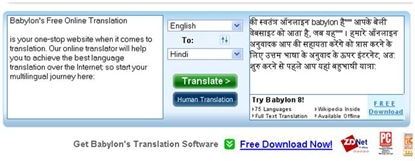
Let us try to translate Babylon’s own English string (copied from their site) in to Hindi through Babylon’s Online Machine translation service:

ORIGINAL :

Babylon's Free Online Translation

is your one-stop website when it comes to translation. Our online translator will help you to achieve the best language translation over the Internet; so start your multilingual journey here:

TRANSLATED :

की स्वतंत्र ऑनलाइन babylon है'''''' आपके बेली वेबसाइट को आता है, जब यह'''''' । हमारे ऑनलाइन अनुवादक आप की सहायता करेंगे को प्राप्त करने के लिए उत्तम भाषा के अनुवाद के ऊपर इंटरनेट; अत: शुरु करने से पहले आप यहां बहुभाषी यात्रा:

Here is the screen shot if you don’t believe it:

clip_image002

Any one with little knowledge of Hindi will outright reject this ridiculous machine translation. For languages like Hindi, where everything – that includes ‘form’ and ‘syntax’ – changes, no machine can ever translate as accurate as Human.

Let us try free Online Dictionary service by Babylon. Though I could not find link to English-Hindi dictionary, I believe Babylon does have it. I tried English-English dictionary for word - ‘Eternal’. The results were quite impressive. I got multiple results and references from Webster's Revised Unabridged Dictionary (1913), Wordnet, Wikipedia etc.

clip_image002[5]

Verdict : Online translation fails, Online Dictionary works, but needs more language options.

Want to learn Linux through Webinar?

This wednesday Digit – India’s premier technology magazine brings to you a webinar - The complete guide to Linux Basics. Webinar is great way to learn things in realtime through your net PC conveniently at your own place.

About this Webinar:

The Linux webinar will be a guide to setting up Linux on a target machine using a number of approaches Including an installation CD/DVD and dual booting with another operating systems.The webinar will have step-by-step screenshots for each of these and some basics on getting started, including setting up drivers and installing additional applications. 

Date: Wednesday, 19th August 2009

Time
: 1500 Hrs (IST, +5.30 GMT)
Click here to open webinar link or copy paste this link in your browser: http://snipurl.com/qd45t

Meeting Key
: thinkdigit

Mark your Calender right now!

----

You too can host webinar through free online tool like dimdim

Read / Download Linux Pocket Guide in Hindi for free

Now you can read / download Linux pocket guide in Hindi here all for free. The book is easier than dummis’ and Idiots’ series.


Download Link


Read in e-paper here: Note that the book is 6+ MB, so it may take a while to load on slow connections.

Linux Pocket Guide in Hindi

Linux Guide in Hindi PDF E-book

Linux pocket guide in Hindi

I had just published my book - "Linux Pocket Guide" in Hindi  through POD (http://nullpointer.debashish.com/print-on-demand)

You can order / have preview of this book from here :
http://pothi.com/pothi/preview?pFile=558

And, yes, the book has some useful chapters like - How to install Linux in Windows / How to run Windows Apps - like MS Office in Linux etc

Run Programs without reinstalling them in Windows 7

While experimenting a little with Windows 7, I happily noticed that my most (even typical ones,) programs installed on the same machine but on different partitions on Windows XP were flawlessly running on Windows 7 too.

What you simply need is to create shortcut of preinstalled programs on you Windows 7 Desktop to run them natively – as they have installed on Windows 7.

It was not the case with earlier windows versions and you need to reinstall all the applications in each and every Windows installations separately!

Windows is learning fast – perhaps with big mistake with Vista?

How to Run KDE in Windows


KDE – the desktop environment for GNU-Linux is true cross platform set of application tools that you can install and use in nearly all top class Operating System environment – and that includes Windows OS too.

Here is no nonsense, straightforward  ‘how to guide’  for you to install KDE 4, the latest version of KDE in Windows XP / Vista / 7 (may work in other Windows versions as well):

Step 1 : Go to this link : http://windows.kde.org/ (direct download link: http://www.winkde.org/pub/kde/ports/win32/installer/kdewin-installer-gui-latest.exe )

and download the latest KDE 4 for Windows GUI installer, and run it. You need to remain connected to Internet since this is an online installer.

It will ask where to download and what to download in its initial Installation wizard , which is pretty straight forward. Please remember to use installation directory such as C:\kde4 that is easily accessible to all. And keep other default settings intact if you are unsure about them. When you are done, click Next.

image001

Step 2 : In its next step, Kde 4 Windows installer will ask you to select download server. Select the one which is close to you and has sufficient bandwidth. Then Click Next.
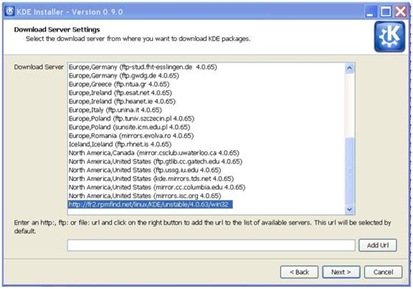
image002

Step 4 : Now you need to select the supported application to download. You can download source code of some of application / packages too. If you are unsure, click on KDE on package category and  KDE application with all dependency files will gets displayed and you can then select them individually. When done, click Next.
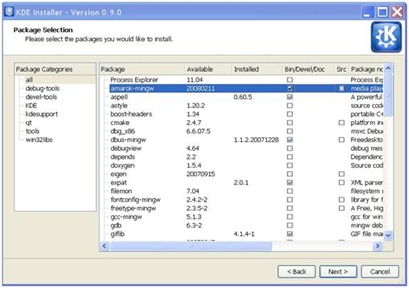
image003

Step 5 : KDE 4 Windows installer will start downloading packages from the mirror server you had selected, and will take a little time to download them that may depend upon your selection. Wait till your download completes. Meanwhile, feel free to perform other windows task till your downloads completes.

image004

Step 5 : After download, KDE 4 Windows installer installs applications and packages you had selected. If you have used 3rd party tools such as Active perl, then you need to give your input such as agree to their license term by clicking I accept button and clicking on next button.

image005

Step 6 : When installations finishes, KDE Installer tells you that now you can run your KDE application in Windows, else it will give you error message, and you need to act upon that. At times, some files may not be available during setup and you can ignore that file.

image006

Step 7 : Before you run KDE application in Windows, you need to give (presently, to fix certain things) following commands in your command window:

C:\KDE4> bin\update-mime-database C:\KDE4\share\mime


And,


C:\KDE4> bin\kbuildsycoca4 --noincremental


Note that c:\kde4 is the directory in which you have installed KDE 4 for Windows, that may be different according to your choice.


Now, you are ready to run your KDE applications in Windows. Go to Bin sub directory under KDE installation directory, and double click on the exe file of KDE program – for example, Ktuberling.exe if you want to run Ktuberling game. And voila this glossy KDE 4 game pops alive in Windows.


image007


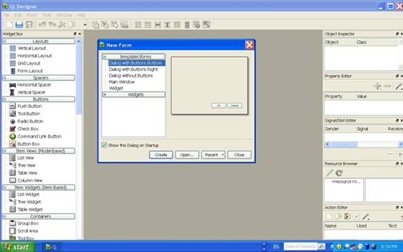
QT designer running on Windows:


image008


Ktuberling and many other KDE application  running on Windows:


image009


KDE’s Khangman with its glossy semitransparent effect running on Windows XP:
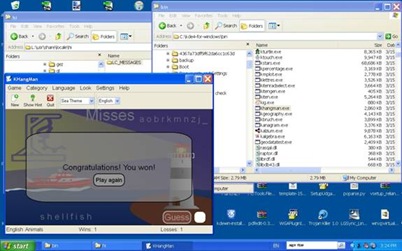


image010


KDE Kmine game in windows:


image011


To SWITCH APPLICATION’S GUI LANGUAGE, click on Help> Switch Application Language then select the language from available list (that depends upon your installed language files that you may have been selected during initial installation dialog ) and restart the application.


Here is the screenshot of multiple applications running in multiple language in Windows XP (Vista and 7 also supports)


image012


You can find latest, further information, support and guide here:


Kde 4 windows how to


http://techbase.kde.org/index.php?title=Projects/KDE_on_Windows/Installation


---

Beware! Google adsense ads may embarrass you and finally may land you in legal hurdles too!

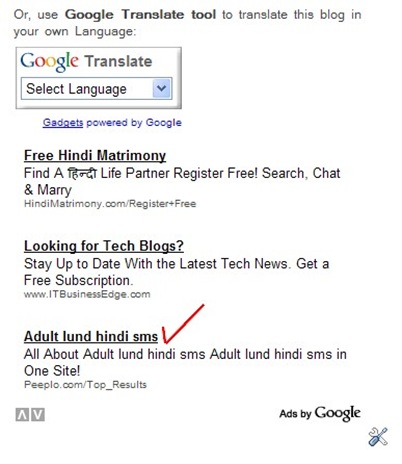
Recently, in one of my Indic blog, a Google Adsense appeard that is really embarrassing to both me and my readers.

Here is the screenshot of ads that appeared:

google adult ads

Apparently, the cunning advertiser had successfully fooled Google bot with Adult Hindi Keywords. I had immediately blocked the URL in Adsense ads filter, but by the time, damages had been done. Moreover, in India, displaying such advertisement in your blog may land you in serious legal hurdles and you may actually land in JAIL displaying such adult content on your blog!

Google must review its own advertisement policy and strict measure must be adopted to curb such menaces. A better solution – such as advertisement moderation is the need of the day.

In the meantime, be aware with your Google Adsense!

Here comes Playboy to sell Silverlight!

read-playboy-for-free

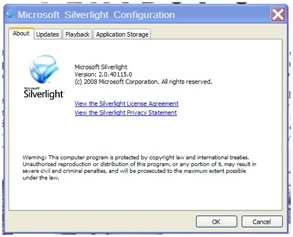
Now you can read past issues of Playboy (55 selected issues spanning from 1955 to 2007) magazine all for free. But you need to download and install Silverlight (a free Microsoft product aming to give real blow to Adobe Flash) to view them.

 read-playboy-for-free-not in flash but in silverligh

Now that war is initiated, won’t Flash offer us free issues of Hustler?


Who knows. Only time will tell.